The AI assistant
Éclair’s AI writing assistant drafts posts, images and edits in your site’s voice, with Claude or ChatGPT and your own key: setup, costs, security.
Contents
- How do you turn on the AI writing assistant in 5 minutes?
- What is the editorial profile?
- What can you ask the AI writing assistant?
- What do the cards below its replies mean?
- Which touch-ups does it offer in the editor?
- How much does the AI writing assistant cost?
- Is the AI assistant safe for your site?
- What if the assistant doesn’t respond?
- Questions about the AI assistant
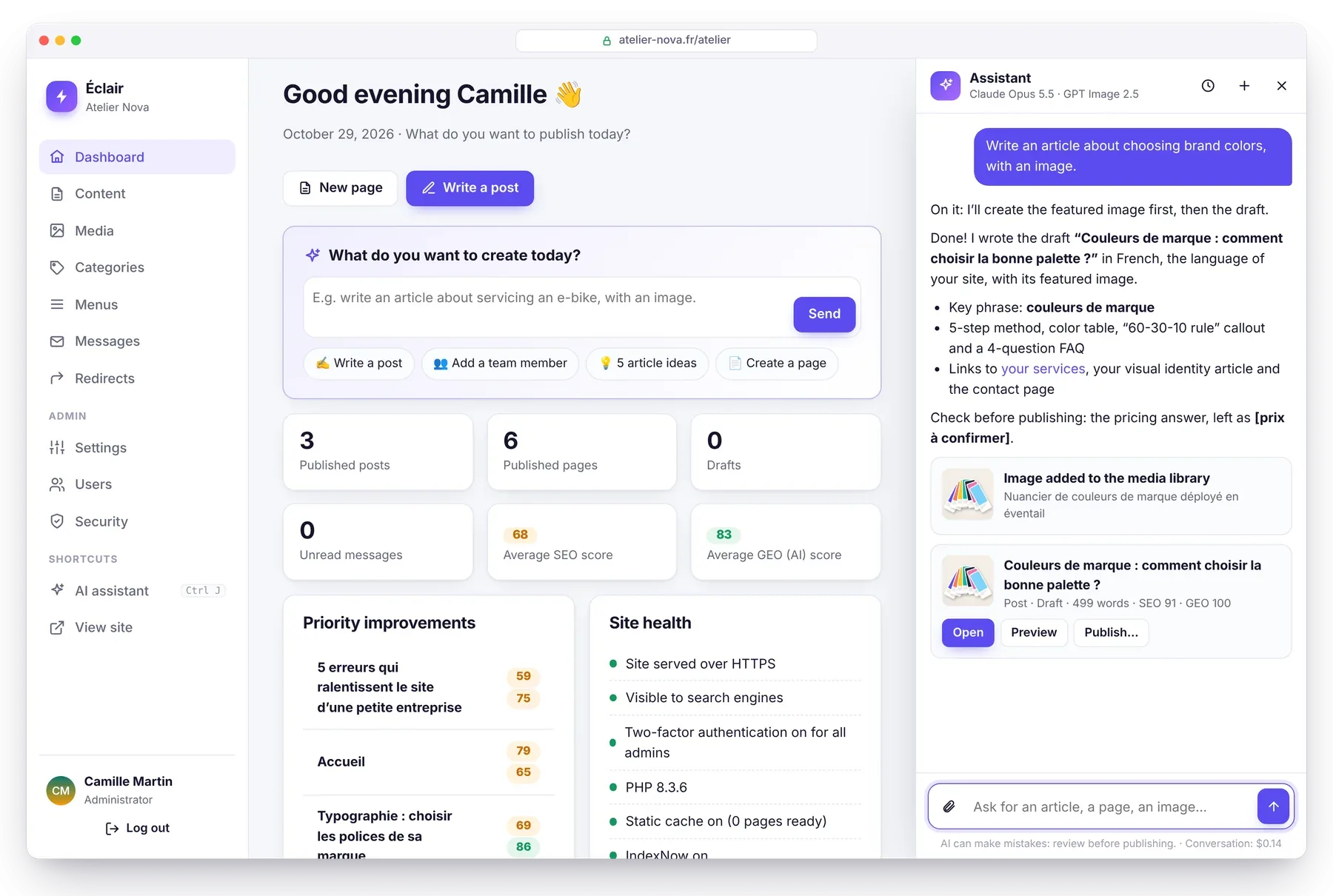
Éclair’s AI writing assistant writes drafts, improves your texts and creates images in your site’s voice. You steer it in plain language, as you would a colleague: “Write an article about choosing brand colors, with an image.” It prepares everything, shows you its SEO and GEO scores, and nothing is published without your click.
How do you turn on the AI writing assistant in 5 minutes?
It works with Claude (Anthropic) or ChatGPT (OpenAI), using your own API key: no Éclair subscription, you pay the provider directly, for what you actually use.
- Create an API key with the provider you chose, on console.anthropic.com for Claude or platform.openai.com for ChatGPT, and add a few dollars of credit.
- In Settings › AI assistant, choose the provider, paste the key, choose the model, then click Test the connection. This test is free: no text is generated.
- For images, choose a generator: GPT Image 2.5 (same key as ChatGPT), FLUX 3 (dashboard.bfl.ai) or Ideogram 3 (ideogram.ai, ideal for visuals that include text). Without a generator, the assistant uses your media library and the photos you attach.
- Click Draft my profile from my site, then review it, adjust it and save.
The assistant then appears in the menu (✨ AI assistant, Ctrl+J), in the editor and on the dashboard. Editors can use it too, if you allow it.
What is the editorial profile?
It’s what makes the AI write like you. It has six fields:
- who you are and what you offer
- who you write for
- tone and style (formal or casual, sentence length, humor)
- your values
- the rules to follow, for example “always link to the contact page” or “never mention prices”
- the image style
One click drafts it from your pages and posts, and you have the final say. With every request, the assistant also follows Éclair’s analysis rules: its drafts aim for a high SEO and GEO score right from the start.
What can you ask the AI writing assistant?
- “Write an article about servicing an e-bike in spring, with an image.”
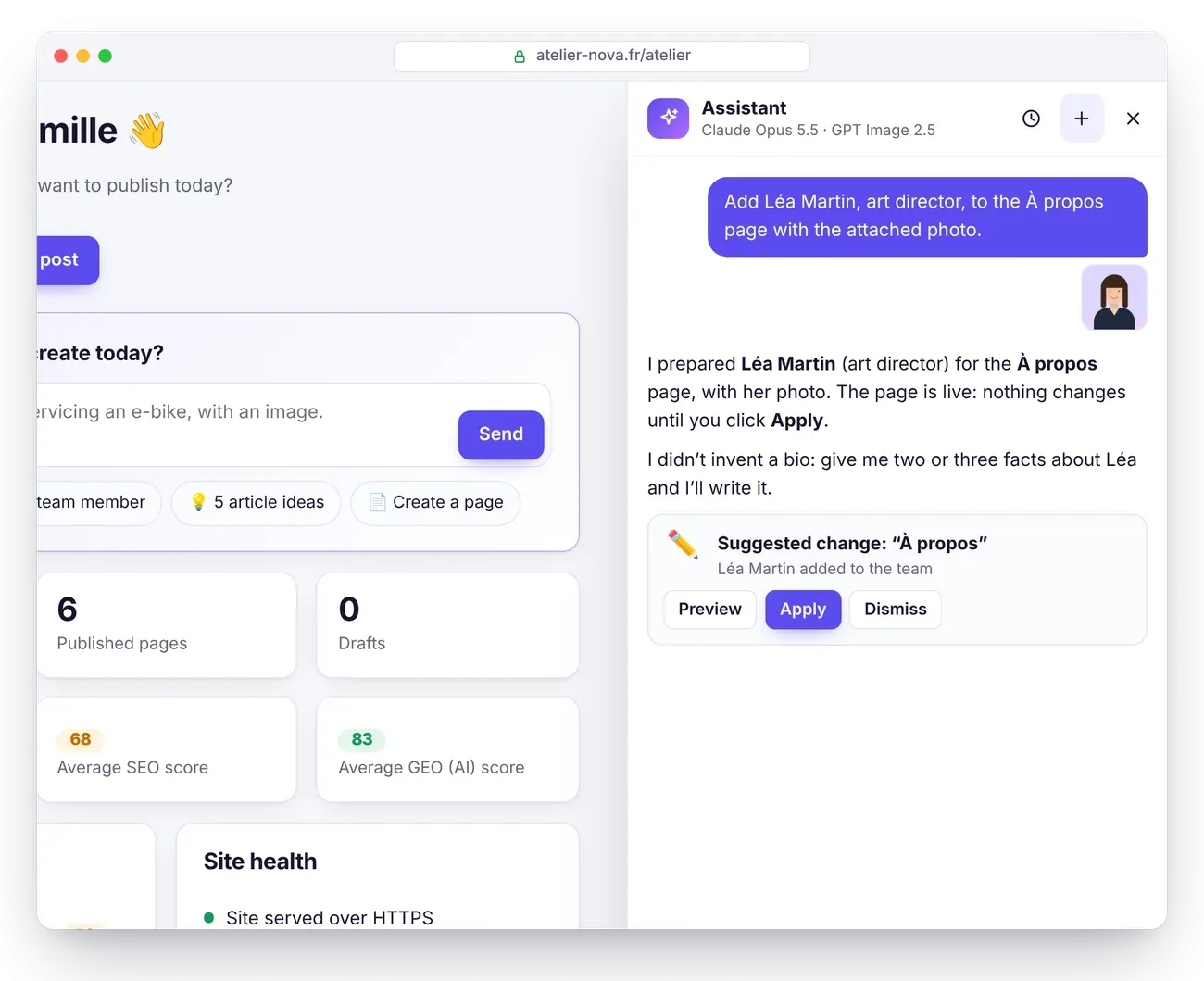
- “Add Léa Martin, art director, to the team page with the attached photo.” Attach the photo with 📎, by drag and drop or by pasting it.
- “Create an ‘Our services’ page that presents our three packages.”
- “Give me 5 article ideas to attract new customers.”
- “Review my home page and suggest improvements.”
- In the editor: “Add a FAQ to this article”, “Make the introduction punchier”.
The assistant never makes up facts about your business, such as prices, opening hours, figures or testimonials. When information is missing, it leaves a visible placeholder such as [price to confirm] and points it out to you.
What do the cards below its replies mean?
Each action produces a card, with the right buttons:
| Card | What happened | Your buttons |
|---|---|---|
| 📝 Draft | New post or new page, never published | Open · Preview · Publish now or schedule |
| ✏️ Suggested change | For published content: nothing changes until you approve | Preview · Apply · Dismiss, then Cancel if needed |
| ✅ Updated | A draft changed directly | Open · Preview · Cancel |
| ✅ Changed in the editor | The content you have open is changed in the editor | Cancel, then you save |
| 🖼️ Image | Image created, optimized as WebP and added to the media library | Featured image, in the editor |
“Cancel” works as long as nobody has edited the content since; otherwise, its earlier versions are still in the editor’s version history. The assistant’s history keeps your last 30 conversations.
Which touch-ups does it offer in the editor?
- Select a passage, then click ✨ in the formatting toolbar: improve, fix mistakes, shorten, expand, simplify, warmer, more professional, translate. “Cancel” restores the text.
- Key takeaways: “Write” button.
- SEO tab: SEO title and meta description, focus keyphrase, title ideas.
- Analysis tab: add a FAQ, fill in missing alt text, “Improve with the assistant”.
- Featured image for posts: “Create with AI”.
- Media library: “Describe with AI” writes an image’s alt text by looking at it.
How much does the AI writing assistant cost?
You pay the provider for what you actually use. Éclair calculates each expense from the billed tokens and shows it in Settings › AI assistant. Here’s an estimate for a full post, about 25,000 input tokens and 7,000 output tokens, searches and checks included:
| Model | Price per million tokens (input / output) | Full post |
|---|---|---|
| Claude Opus 5.5 (the most capable) | $4 / $20 | ≈ $0.24 |
| Claude Sonnet 5.5 | $2 / $10 | ≈ $0.12 |
| Claude Haiku 5.5 | $0.10 / $0.50 | < $0.01 |
| GPT-6 Astra | $10 / $50 | ≈ $0.60 |
| GPT-6.1 Sol | $2 / $10 | ≈ $0.12 |
| GPT-6.1 Terra | $1 / $5 | ≈ $0.06 |
| GPT-6 Luna | $0.10 / $0.50 | < $0.01 |
An image costs about $0.05 (FLUX 3 at 1 megapixel: $0.048). Public prices as of October 29, 2026, from the official pages of Anthropic, OpenAI and Black Forest Labs; they may change. The assistant’s fixed instructions are cached by the provider, which lowers the cost of follow-up requests.
Is the AI assistant safe for your site?
- The AI prepares, you decide: it can search and read your content, create drafts, edit a draft (undoable), suggest a change to published content and create images. It can’t publish, delete, or touch the settings, menus or accounts.
- Encrypted keys on your server (libsodium, or AES-256-GCM), never sent to the browser or displayed: only a hint like “sk-ant…ab12” is shown. They’re excluded from backups, as is the conversation history.
- What goes to the provider: your request, the images you attach, the editorial profile and the relevant context (the list of your content, the content you have open). Don’t include sensitive data. According to their terms as of October 29, 2026, Anthropic doesn’t train its models on data sent through the API, and neither does OpenAI by default.
- Sanitized content: everything the AI writes goes through the same allowlist as the editor. Content it reads is treated as data, never as instructions.
For stronger protection, add define('ECLAIR_SECRET', 'a-long-secret-phrase'); to eclair-config.php before you save your keys.
What if the assistant doesn’t respond?
| Message or symptom | Fix |
|---|---|
| “API key rejected” | The key is incomplete or revoked: paste it again and test the connection. |
| “Out of credit” | Top up your account with the provider. |
| “This month’s AI budget is used up” | Raise the budget in Settings › AI assistant, or wait until next month. |
| The reply arrives all at once | A buffer at your host is holding back the stream. Everything works; on Nginx, add fastcgi_buffering off;. |
| “Can’t reach…” | Your host blocks outgoing connections: ask them to allow api.anthropic.com or api.openai.com. |
| The assistant doesn’t appear | It needs the PHP cURL extension and encryption (sodium or openssl). |
Other issues? Check the Troubleshooting guide and the article Éclair 1.2.0: the AI assistant writes, you publish.
Questions about the AI assistant
Do I need a subscription to use the AI assistant?
No. You use your own Claude or ChatGPT API key and pay the provider for what you actually use, for example about $0.24 for a full post with Claude Opus 5.5. Éclair itself remains free.
Can the assistant publish a post without me?
No, never. It creates drafts and suggestions; publishing, deleting or changing settings always takes a human click.
Are my API keys safe?
They’re encrypted on your server, never sent to the browser or displayed, and excluded from backups. Add ECLAIR_SECRET to eclair-config.php for stronger protection.
Can I turn the assistant off?
Yes: in Settings › AI assistant, choose “Off”. No data is then sent to any AI.