AI in Éclair: the built-in assistant and the MCP connector
Éclair is an AI CMS: a built-in assistant with your API key and an MCP connector for Claude and ChatGPT. Drafts in your voice, nothing published without you.
Contents
- Built-in assistant or MCP connector: which one should you choose?
- What does the built-in AI assistant do?
- How do you create an entire page with AI?
- How does the MCP connector for Claude and ChatGPT work?
- Which Claude and ChatGPT plans are compatible?
- What can you ask the AI?
- Does your site stay under your control?
- Why an AI CMS rather than a chatbot on the side?
- Questions about AI in Éclair
Éclair is an AI CMS designed so that artificial intelligence helps you without ever replacing you: it prepares, you decide. You can use it in two ways, separately or together: the assistant built into the admin, with your own API key, or the MCP connector, which opens your site to Claude or ChatGPT with the subscription you already have.

Built-in assistant or MCP connector: which one should you choose?
Both give the AI the same tools and the same safeguards. The difference lies in where you work and how you pay.
| Criterion | Built-in assistant | MCP connector |
|---|---|---|
| Where you work | In the Éclair admin (Ctrl+J) | In Claude or ChatGPT, on the web or in the desktop app |
| What you pay | Your API key, for what you actually use: about $0.24 per full post with Claude Opus 5.5 | Nothing more: your Claude or ChatGPT subscription does the work |
| Images | Yes: GPT Image 2.5, FLUX 3 or Ideogram 3, about $0.05 per image | No, so that the connector never costs the site anything |
| Best for | Writing and touching up without leaving the editor | People who already live in Claude or ChatGPT |
Prices as of October 29, 2026, from the official Anthropic and OpenAI pages: the per-model breakdown is in the AI assistant documentation.
What does the built-in AI assistant do?
You talk to it as you would to a colleague: “Write an article about servicing an e-bike, with an image.” It checks that the topic isn’t already covered, creates the image, writes the complete draft in your site’s voice and shows it to you with its SEO and GEO scores.
- Drafts of posts and pages, structured for Google and AI: question-style subheadings, FAQ, “Key takeaways”, internal links.
- Entire pages (new in 1.7): describe your page, and the AI composes a complete draft in sections, which opens directly in Visual mode.
- Suggested changes to content that’s already published: you preview them, then apply or dismiss them.
- Touch-ups in the editor on a selected passage: improve, fix mistakes, shorten, expand, simplify, translate.
- Product pages from a photo, without ever making up a price or a payment link.
- Your editorial profile, drafted from your site in one click, so that the AI writes like you.
- Your choice of AI for each conversation, if you’ve saved both a Claude key and a ChatGPT key.
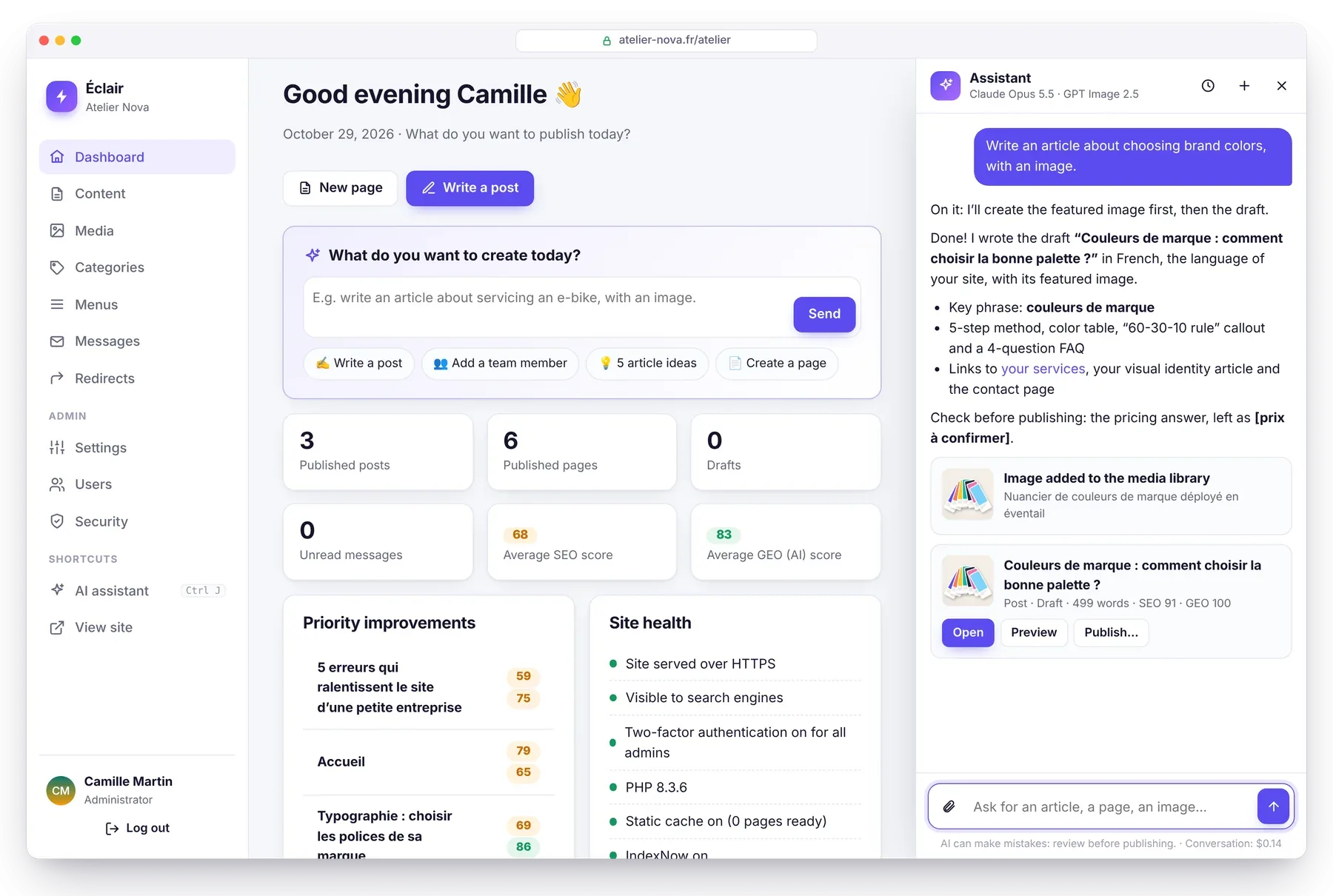
Safeguards are on by default: a monthly budget of $10, checked before each step, 60 requests per person per day, and keys that are encrypted and excluded from backups. Full instructions: the AI assistant, step by step.
How do you create an entire page with AI?
New in Éclair 1.7, and it’s what makes it a true AI CMS: in a new piece of content (page, post or product), the ✨ Create with AI box composes a complete draft in a single call.
- Describe your page in one or two sentences, then, if you like, add its goal (“get quote requests”), its audience, its tone and the sections you want (“banner, benefits, pricing, FAQ, contact”).
- The estimated cost is shown before you start: about $0.08 with Claude Sonnet 5.5 and $0.16 with Claude Opus 5.5, taken from the assistant’s budget.
- After 20 to 60 seconds, the draft opens in Visual mode: title, URL, SEO title, meta description, “Key takeaways” and a layout in sections, with your real pages for the links and your images.
The AI makes nothing up: a missing price, opening hours or figure stays flagged with a “To complete” marker, and the SEO analysis reminds you until it’s filled in. The draft is never published without you. Costs estimated by Éclair’s guide, based on Anthropic’s prices: $2 / $10 per million input / output tokens for Claude Sonnet 5.5, $4 / $20 for Claude Opus 5.5 (as of October 31, 2026).
How does the MCP connector for Claude and ChatGPT work?
MCP (Model Context Protocol) is the open standard that connects AI assistants to tools. Éclair has an MCP server built in: once you’ve added the connector in Claude or ChatGPT, your AI reads your content, gets your editorial profile and Éclair’s SEO and GEO rules, writes drafts and prepares changes. No API key, no cost for the site.
- Your site uses HTTPS: Claude and ChatGPT refuse any other URL.
- In Settings › AI assistant, turn on Allow MCP connections and copy the connector URL (it ends with
/_eclair/mcp). - Add it in Claude (Customize › Connectors) or in ChatGPT (Plugins), then give your approval on your site.
Each draft comes back with a link to open it in Éclair; each suggestion opens in the editor without being saved: you review it, then save it, or you close it and nothing changes. Since 1.7, your AI can also compose an entire page in sections (banner, features, FAQ, buttons…), just like the built-in assistant. The detailed steps are in the MCP connector guide.
Which Claude and ChatGPT plans are compatible?
| Plan | Read the site | Drafts and suggestions |
|---|---|---|
| Claude Free, Pro, Max, Team, Enterprise | ✅ | ✅ (Free: only one custom connector) |
| ChatGPT Business, Enterprise, Edu | ✅ | ✅ |
| ChatGPT Pro | ✅ | ❌ (read-only) |
| ChatGPT, other plans | not listed in OpenAI’s help |
Plans checked on October 30, 2026, in Claude’s help on custom connectors and OpenAI’s help on custom MCP servers. They change quickly: check in your app.
What can you ask the AI?
- “Look at my site and suggest 5 article ideas that are missing.”
- “Write a draft article about servicing an e-bike, with a FAQ.”
- “Create a Pricing page with three packages, a FAQ and a contact form.”
- “Review my homepage and suggest a more direct tagline.”
- “Translate my About page into French, as a draft.”
- “Create a product page from the attached photo. Price: €29.90.” (built-in assistant)
Does your site stay under your control?
Yes, and that’s at the heart of Éclair’s design:
- The AI never publishes or deletes anything. It creates drafts and prepares suggestions; the “Publish” button stays yours.
- The connector is off by default, protected by OAuth 2.1 and PKCE. You give your approval after logging in to your account, two-factor authentication included, and each app can be disconnected in one click.
- Content the AI reads is treated as data, never as instructions: a booby-trapped page can’t give it orders.
- What goes to Anthropic or OpenAI: the content the AI reads to answer you, under the terms of your subscription or your API agreement.
The technical details, security review included, are in Éclair’s security.
Why an AI CMS rather than a chatbot on the side?
A chatbot on its own knows nothing about your site, your existing pages or the rules of SEO. In an AI CMS like Éclair, the AI works inside your site: it avoids topics you’ve already covered, creates internal links to your real pages, follows your editorial profile and delivers drafts that are already scored for SEO and GEO. You go from an idea to a page ready to review in a few minutes, without any copying and pasting.
Questions about AI in Éclair
Do I have to pay to use AI in Éclair?
Éclair is free. The MCP connector adds no cost: your Claude or ChatGPT subscription does the work. The built-in assistant uses your own API key, billed by the provider for what you actually use: about $0.24 per full post with Claude Opus 5.5 (prices as of October 29, 2026).
Can the AI publish or delete a page for me?
No. Both the assistant and the connector create drafts and prepare suggested changes. Only you publish, in Éclair’s editor.
Can the AI create a complete page?
Yes, since Éclair 1.7: describe the page and the AI composes a complete draft in sections, with its title and description for Google, which opens in Visual mode. Expect about $0.08 with Claude Sonnet 5.5 in the built-in assistant; with the MCP connector, your subscription does the work.
Which ChatGPT plans work with the MCP connector?
According to OpenAI’s help, checked on October 30, 2026: Business, Enterprise and Edu to read and write, Pro read-only. On the Claude side, every plan works, with only one custom connector on Free.
Can I use the built-in assistant and the MCP connector at the same time?
Yes. They share the same tools and the same safeguards: you can write in ChatGPT in the morning and touch up in Éclair’s editor in the afternoon.
Does the MCP connector work on shared hosting?
Yes, as long as the site uses HTTPS. On Apache, keep Éclair’s .htaccess file up to date: it passes along the authorization header that some hosts strip.