Selling online with Éclair: the lightweight shop
An online store without a subscription: product pages built for Google, payment through a Stripe, PayPal or Revolut link, no payment details stored.
Contents
- How does Éclair’s shop work?
- How much does an online store without a subscription cost?
- How do you create a product page?
- Are your products visible on Google and in AI answers?
- Who is the lightweight shop for?
- What doesn’t Éclair’s shop do?
- What are your obligations before opening your shop?
- Questions about the online store
Want to sell a few products without paying an e-commerce platform every month? Éclair gives you an online store without a subscription: one page per product, a Buy now button linked to a Stripe, PayPal or Revolut Business payment link, and that’s it. Your payment provider collects the payment, sends the receipts and handles refunds; you pack and ship.
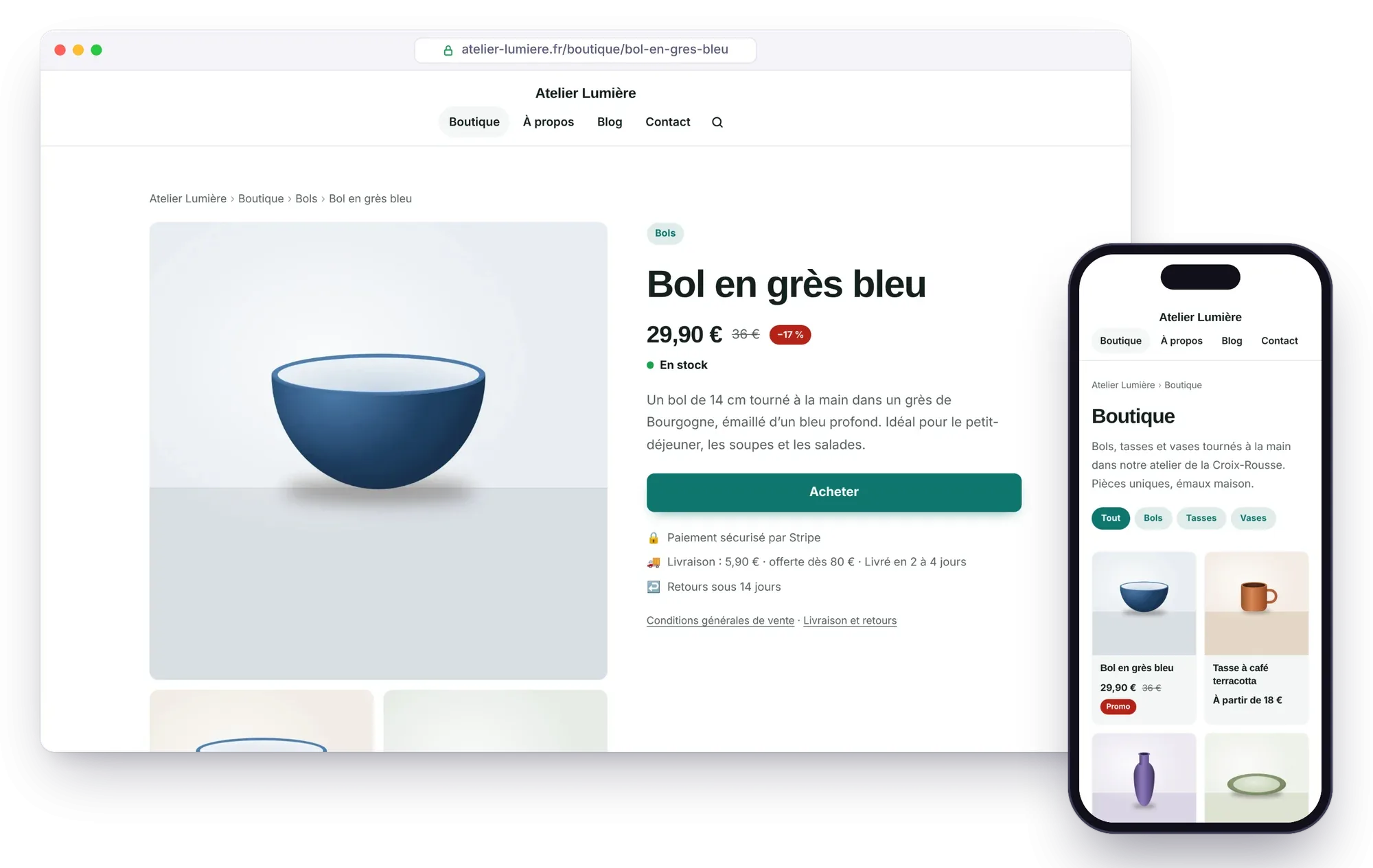
How does Éclair’s shop work?
The shop adds a new type of content, the product, alongside pages and posts. The buying journey takes three steps:
- Your customer finds a product page: photos, price, compare-at price if there is one, variants (size, color), stock, shipping costs and return conditions.
- They click Buy now and land on the secure checkout page of Stripe, PayPal or Revolut, which collects the payment and sends them the receipt.
- With Stripe, they come back to your thank-you page; with PayPal or Revolut, they see the provider’s confirmation page. You find the order in your Stripe, PayPal or Revolut account.
No payment details pass through your site, and there’s no cart or customer account to manage: that’s what makes the shop so light and so safe.
How much does an online store without a subscription cost?
Éclair costs nothing, and Stripe charges no subscription or setup fee: you only pay a fee on each payment, for example 1.5% + €0.25 for a standard card from the European Economic Area (2.8% + €0.25 for a premium card, 3.15% + €0.25 for a card from outside the EEA). These are Stripe’s prices for France, as of October 30, 2026, on stripe.com/fr/pricing.
With PayPal and Revolut Business, you also pay a fee on each payment. With PayPal in France: 1.2% + €0.35 by card and 2.9% + €0.35 with a PayPal account, plus 1.99% if the buyer is outside the EEA (PayPal’s fee schedule, updated July 15, 2026). With Revolut Business: 1% + €0.20 for a consumer card issued in the EEA (Revolut’s help page). Prices as of October 31, 2026.
| Selling 20 products at €30 each per month | Éclair + Stripe | Subscription e-commerce platform |
|---|---|---|
| Platform subscription | €0 | For example, Shopify Basic: $29 a month billed yearly, $39 billed monthly |
| Payment fees | 20 × (€0.45 + €0.25) = €14 a month | Depends on the payment method you choose |
| Payment details on your server | None | None |
| Hosting | Your current shared hosting | Included |
Shopify prices shown on shopify.com/fr/tarifs on October 30, 2026; they vary by country and currency. Over a year, the Basic plan adds up to at least $348, before any fees.
How do you create a product page?

- In Content › + Product, enter the price, the compare-at price if you’re offering a discount, and the availability (in stock, sold out, pre-order).
- In Stripe, PayPal or Revolut Business, create a fixed-price payment link for the product and paste it into the product page. With Stripe, Éclair adds the product reference to it, so each payment shows what was bought.
- Add at least three photos; the first one is also used for Google and social media.
- Describe the product with the usual blocks, file it in a product category, and publish.
Short on ideas? Attach a photo to the AI assistant: “Create a product page from the attached photo. Price: €29.90.” It writes a complete draft, without ever making up a price, a discount or a payment link.
Are your products visible on Google and in AI answers?
Yes, and it’s actually the strong point of Éclair’s shop compared with a store cobbled together from payment buttons:
- Product and Offer structured data on every product page: price, currency, stock, condition, brand, shipping cost and delivery time, return policy. This is the information Google shows in its product results.
- A Google Merchant Center feed (
/products.xml): add it as a product source to appear for free in the Shopping tab. - Price and availability in
llms.txtand in the Markdown version of each product page, so that ChatGPT, Perplexity or Claude cite your products accurately. - Product categories as pillar pages, a sitemap with every photo, and breadcrumbs.
Who is the lightweight shop for?
- Makers and craftspeople who sell a few dozen pieces: jewelry, ceramics, illustrations, clothing.
- Freelancers who sell a service or a digital product at a fixed price: a session, a workshop, a downloadable template (no shipping).
- Authors and trainers who want to sell directly, alongside their usual platforms.
- Small businesses that want to try selling online without committing to a subscription.
What doesn’t Éclair’s shop do?
It stays simple on purpose. It has no multi-product cart, no discount codes, no customer accounts and no automatic inventory management. If you sell hundreds of products or need these features, a full e-commerce platform such as Shopify, WooCommerce or PrestaShop will be a better fit. Our Éclair vs WordPress comparison helps you decide.
What are your obligations before opening your shop?
Éclair won’t open the shop until your legal notice and terms of sale are published. Have them reviewed: as the seller, you’re legally responsible for them. In the European Union, distance selling gives consumers at least 14 days to withdraw, with some exceptions such as personalized products (Directive 2011/83/EU, Articles 9 and 16). The prices shown are the ones you enter: display them with taxes included if you sell to consumers.
The complete setup, setting by setting: the shop, step by step.
Questions about the online store
Do I need a subscription to sell with Éclair?
No. Éclair is free and Stripe charges no subscription: you only pay its fee on each sale, for example 1.5% + €0.25 for a standard European card (prices as of October 30, 2026). With PayPal or Revolut Business, you also pay a fee on each sale.
Can I use PayPal or Revolut instead of Stripe?
Yes, since Éclair 1.6: PayPal and Revolut Business payment links are recognized, and the product page shows “Secure payment with PayPal” or “with Revolut”. Any other provider works too, as long as its payment link starts with https://.
How many products can I sell with the lightweight shop?
It’s designed for a few dozen products, with their variants. Beyond a few hundred products, or if you need a cart and discount codes, choose a full e-commerce platform.
Can my customers buy several products at once?
Not with a cart: each Buy now button leads to the payment for one product. You can, however, create a “bundle” product, with its own price and payment link.
Does the shop slow down my site?
No. Its styles are only included when it’s open, and product pages are served from the same static cache as your other pages.