Your pro website from A to Z
The Éclair CMS AI Agent asks you about 5 minutes of questions, then builds your complete website on your computer: pages, copy, design, images, SEO, GEO, mobile version, legal pages and admin account. It delivers a ZIP file ready to upload to your hosting. Free, in Claude Code or Codex.
The agent in numbers
5 min
of questions, one at a time, with clickable choices
8
steps, from your business to the file ready to upload
12
Éclair art directions, 3 of them proposed for you
1 ZIP
plus a separate access file, never uploaded online
What is the Éclair CMS AI Agent?
It is a working folder for your coding assistant. It contains the rules, the full method and a build engine. You open it in Claude Code (or Codex), paste the starter prompt, and the agent guides you all the way to the delivered site. Everything happens on your computer: it uploads nothing to your hosting and buys nothing on your behalf.
It understands
One open question about your business, then a business sheet in one message: services, area, hours, prices, what sets you apart.
It proposes
Site type, pages, menu, tone and three art directions: approve in one click or change a word.
It checks
Every page is verified: mobile, single heading, description, structured data, sitemap, llms.txt, no gaps in the copy.
It delivers
A ZIP ready to upload, a 5-step installation guide and an admin access file.
What do you need?
- Claude Code (desktop app or terminal) or Codex.
- PHP 8.1 or later (php.net) on your computer: the agent checks and offers to install it if missing, with your consent.
- git, often already there: the agent checks that too.
- Optional: an account with fal.ai (recommended), OpenAI or Black Forest Labs with a few euros of credit, if you want AI-generated images.
- Web hosting with PHP (o2switch, OVHcloud, Hostinger, IONOS…) and, ideally, your domain name. If not, the agent helps you choose.
How do you get started in 1 minute?
- Download the AI Agent and unzip it wherever you like, for example in
Documents/Agent-IA-Eclair-CMS. - Open the folder in Claude Code (“Open folder”) or run
claudein that folder. - Paste the prompt from the
PROMPT-DEMARRAGE.txtfile. - Answer the questions. At the end, everything is in the
sortie/folder.
Hello! Read CLAUDE.md then REGLES.md, and start the creation journey for my Éclair CMS website. Ask me the questions one by one.The 8 steps of the journey
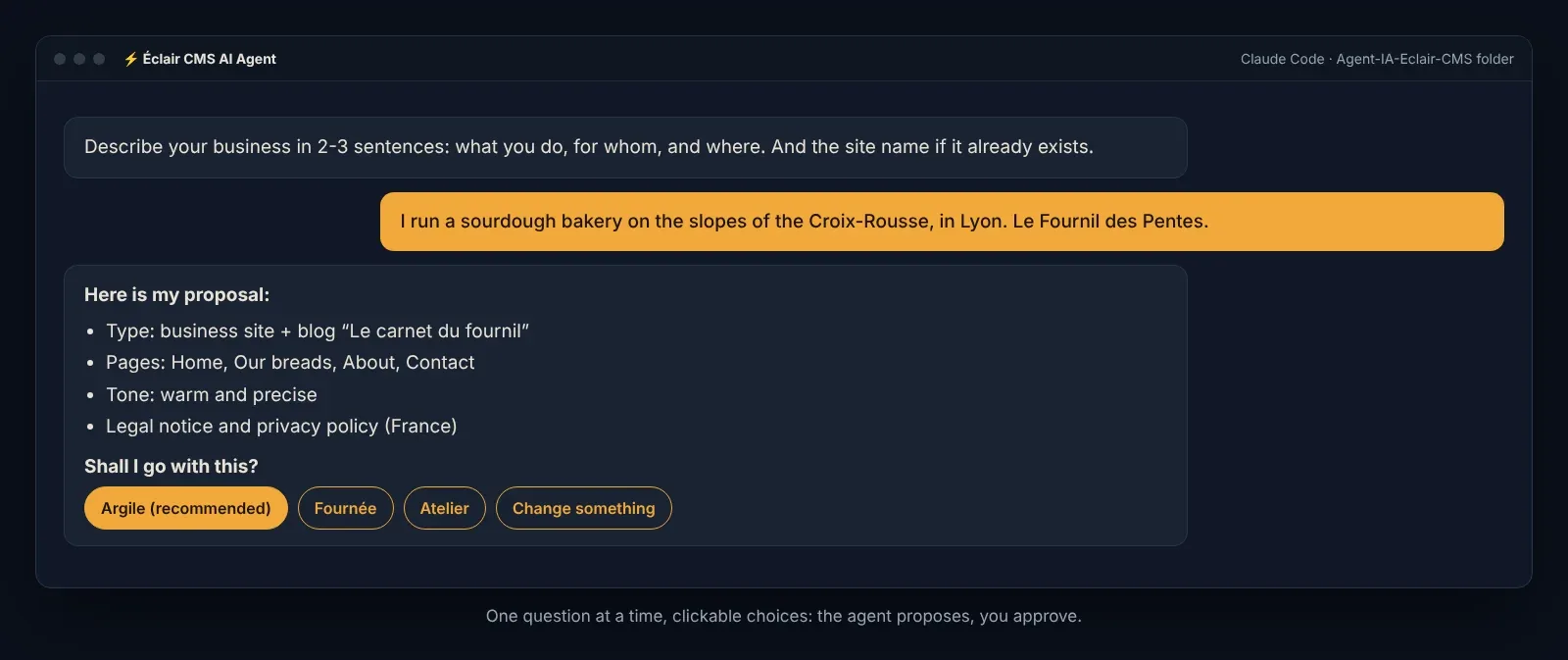
The agent asks few questions: it infers as much as possible from your description and presents a proposal for you to approve. Nothing is asked twice.
| Step | What the agent does | What you do |
|---|---|---|
| 1. Your business | Asks you to describe your business in 2-3 sentences | You answer in a few words |
| 1 bis. Business sheet | Asks for 6 to 8 facts in a single message | You give them in any order |
| 2. Proposal | Proposes site type, pages, tone and 3 art directions | You approve or adjust |
| 3. Site address | Checks the domain and hosting, or helps you choose | You choose |
| 4. Images | Uses your photos or generates images with AI | You choose the source |
| 5. Legal pages | Sends a form adapted to your country and status | You fill it in one message |
| 6. Admin | Creates your account with a strong password | You give name, e-mail and a short bio |
| 7-8. Build and delivery | Writes, builds, checks, improves the copy, delivers the ZIP | You collect your site |
How does the agent build and check your site?
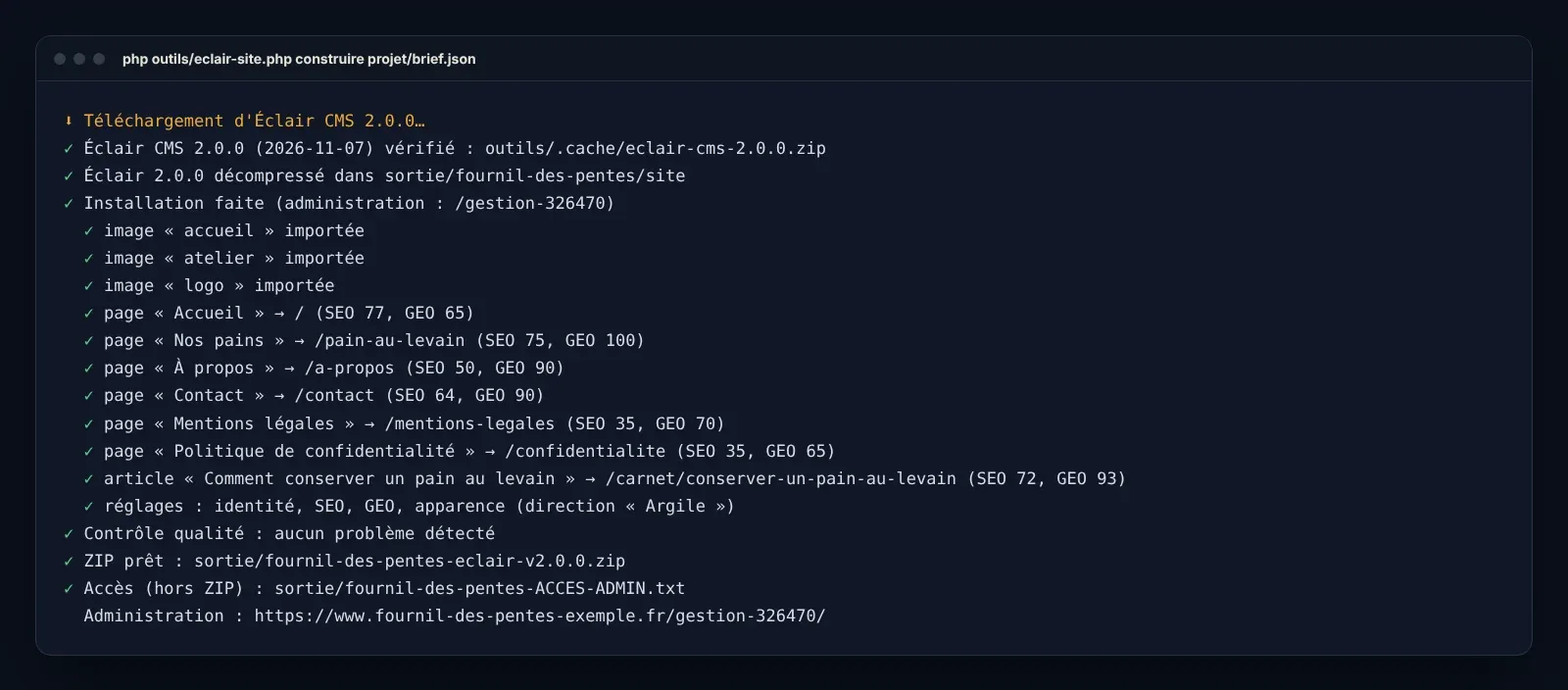
Once your answers are stored in the projet/brief.json file, the agent writes all the copy following Éclair’s SEO and GEO rules, then runs the engine. It downloads the latest version of Éclair (signature and checksum verified), installs it with the official wizard, applies your brief (pages, posts, images, menus, settings, art direction) and checks every page. The agent then reads the SEO and GEO analysis and improves the copy, in two passes at most.
What the engine checks on every page
Mobile display
Every page is checked for small screens.
SEO
A single main heading, a description, short URLs and the sitemap.
GEO
JSON-LD structured data, robots.txt and llms.txt to be read and cited by AI.
No gaps
A “[À compléter]” passage blocks delivery: the agent asks you the missing question.
What do you get at the end?
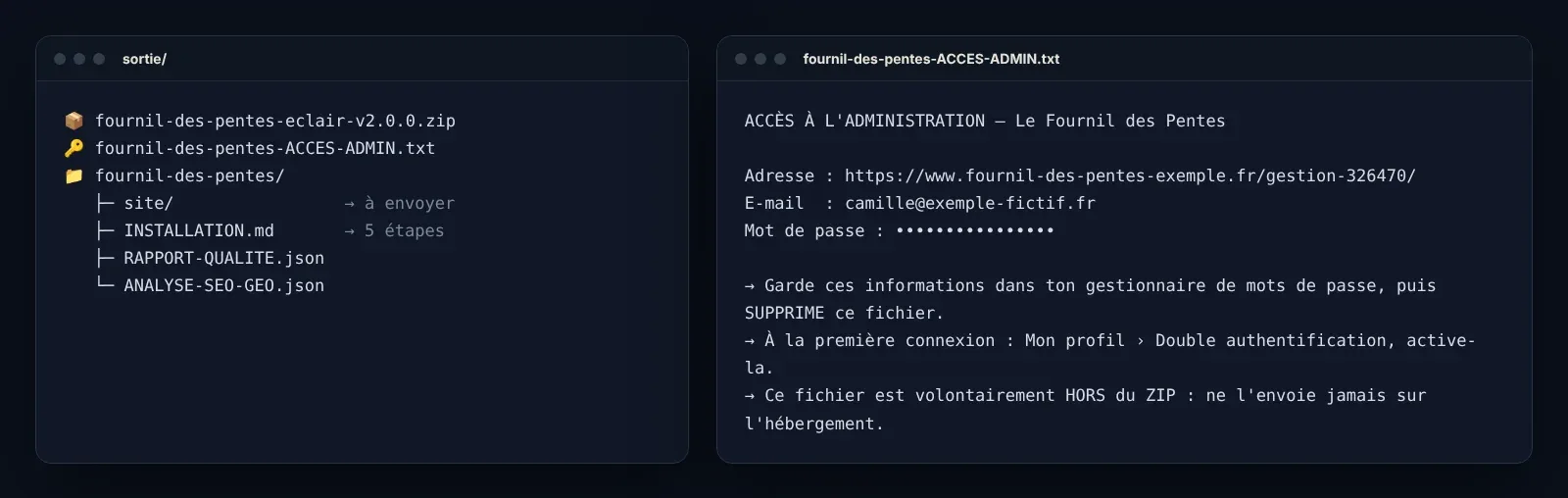
Everything lands in the sortie/ folder: the site ZIP, ready to upload, and next to it, never inside, a file with your admin address, your e-mail and your password. An INSTALLATION.md guide explains going live in 5 steps, and two reports detail the quality and the SEO and GEO analysis.

The rules that protect you
Nothing made up
No prices, reviews, labels or years of experience you didn’t give.
Your keys stay with you
API keys go in projet/.env, never in the site.
Password outside the ZIP
It is generated strong and stored next to the ZIP so it never ends up online.
A discreet admin
The admin address is custom, never /admin.
Serious legal pages
France, Spain and other countries: templates based on official texts, to have reviewed if needed.
Nothing without your consent
No upload to your hosting, no domain purchase, no software install without consent.
What the agent doesn’t do (and the solution)
- Built-in appointment booking: a “Book an appointment” button to your tool (Calendly, Cal.com, Doctolib…).
- A two-language site in one go: the site is built in one language, the second is added later in the admin.
- Cart and customer accounts: Éclair’s lightweight shop with payment links covers selling a few dozen products; beyond that, see the Éclair skills.
- Guaranteed rankings: the agent gives an excellent base (speed, SEO, GEO), not a ranking promise.
What if something gets stuck?
| Problem | Solution |
|---|---|
| PHP isn’t installed | Ask the agent to install it (on a Mac: brew install php). |
| Éclair can’t be downloaded | Download the archive from the Download page, then run the build again with --zip=path/to/the/file.zip. |
| “Site NON livré” | Some information is missing, often in the legal pages: answer the agent’s question and it rebuilds. |
| Images: error 401 or 403 | Wrong key or no credit left with the provider: check projet/.env. |
| Online, only the home page works | The hidden .htaccess file wasn’t uploaded: show hidden files and upload it next to index.php. |
| HTTPS redirect loop | Activate the Let’s Encrypt certificate at your host and wait a few minutes. |
Frequently asked questions about the Éclair CMS AI Agent
Is the Éclair CMS AI Agent free?
Yes, the agent and Éclair CMS are free. You only pay for your assistant (Claude or Codex subscription), your hosting and, if you choose it, a few euros of AI-generated images.
How long does it take to create a site?
About 5 minutes of questions, plus 5 to 15 minutes the very first time if PHP needs installing. The build itself takes a few seconds to a few minutes.
Do I need to know how to code?
No. You answer simple questions, often with one click. The agent explains each step without jargon.
Which AI assistant do I need?
Claude Code (desktop app or terminal) or Codex. The agent contains instructions for both.
Does the agent put the site online for me?
No, on purpose. It delivers the ZIP and a 5-step guide; you upload it to your hosting. It buys nothing and uploads nothing on your behalf.
Are my data and keys safe?
Everything is built on your computer. API keys stay in projet/.env, the password in a separate file, never in the ZIP.
Can I use my own photos?
Yes. Drop them in projet/images/: the agent looks at them to write accurate alt texts and place them in the right spot.
Are the legal pages reliable?
They are templates based on official texts (France, Spain and other countries). For a regulated activity or online selling, have them reviewed by a professional.
Can I change the site after delivery?
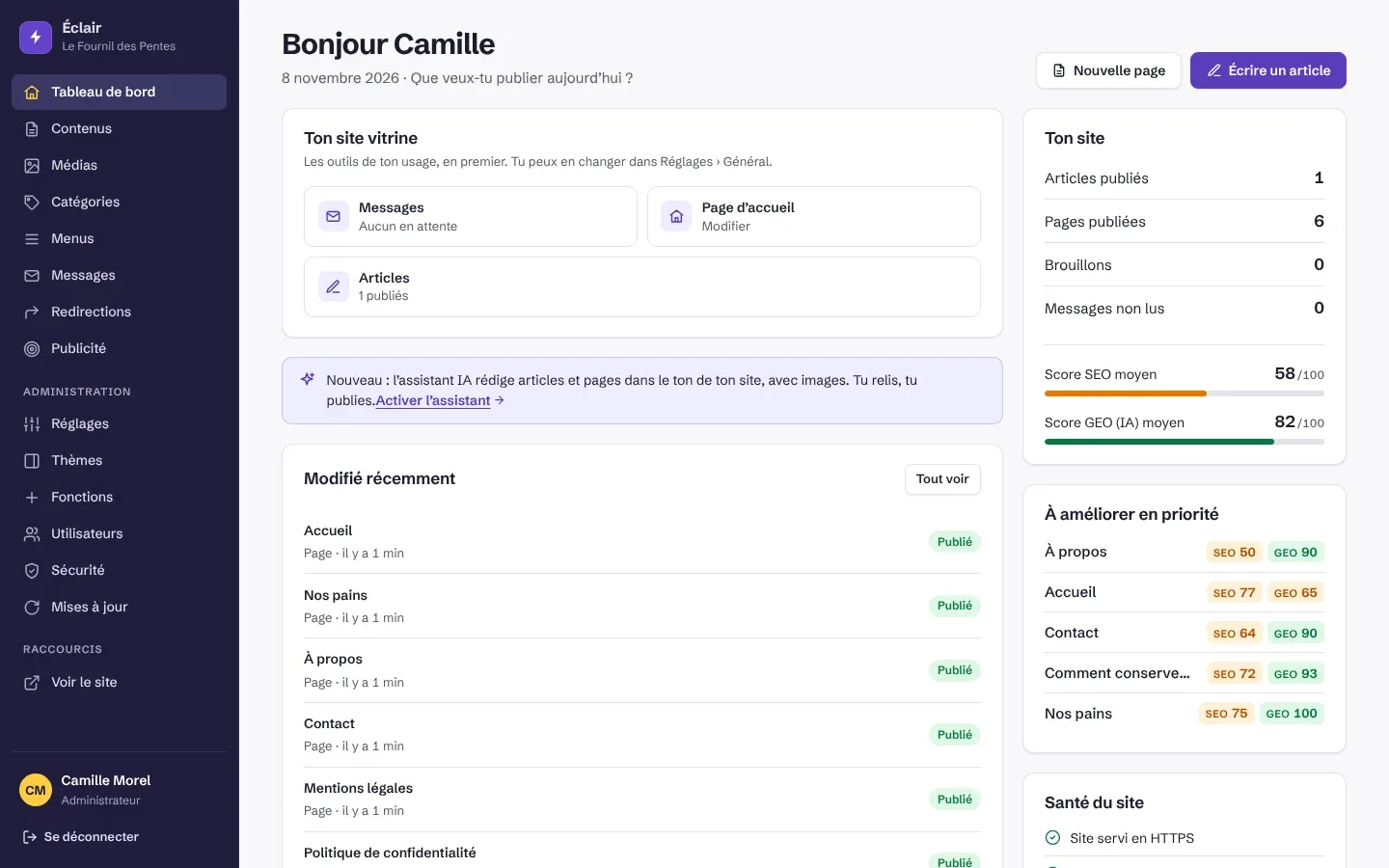
Yes, from the Éclair admin. You can also ask the agent again: “add a pricing page”, “change the colours”, and it rebuilds.
Will my site rank well?
The agent follows Éclair’s SEO and GEO rules and checks every page. It doesn’t guarantee a Google position or an AI citation: nobody can.
Create your website today
Download the Éclair CMS AI Agent, open it in Claude Code and answer the first question.