Leave WordPress without starting from scratch
Éclair Migrate will be an assistant that imports your WordPress content into Éclair CMS: pages, posts, media, categories, authors, SEO meta and redirects. Before any switchover, it will show you what will transfer cleanly and what will need your attention.
Available now: the one-transfer migration
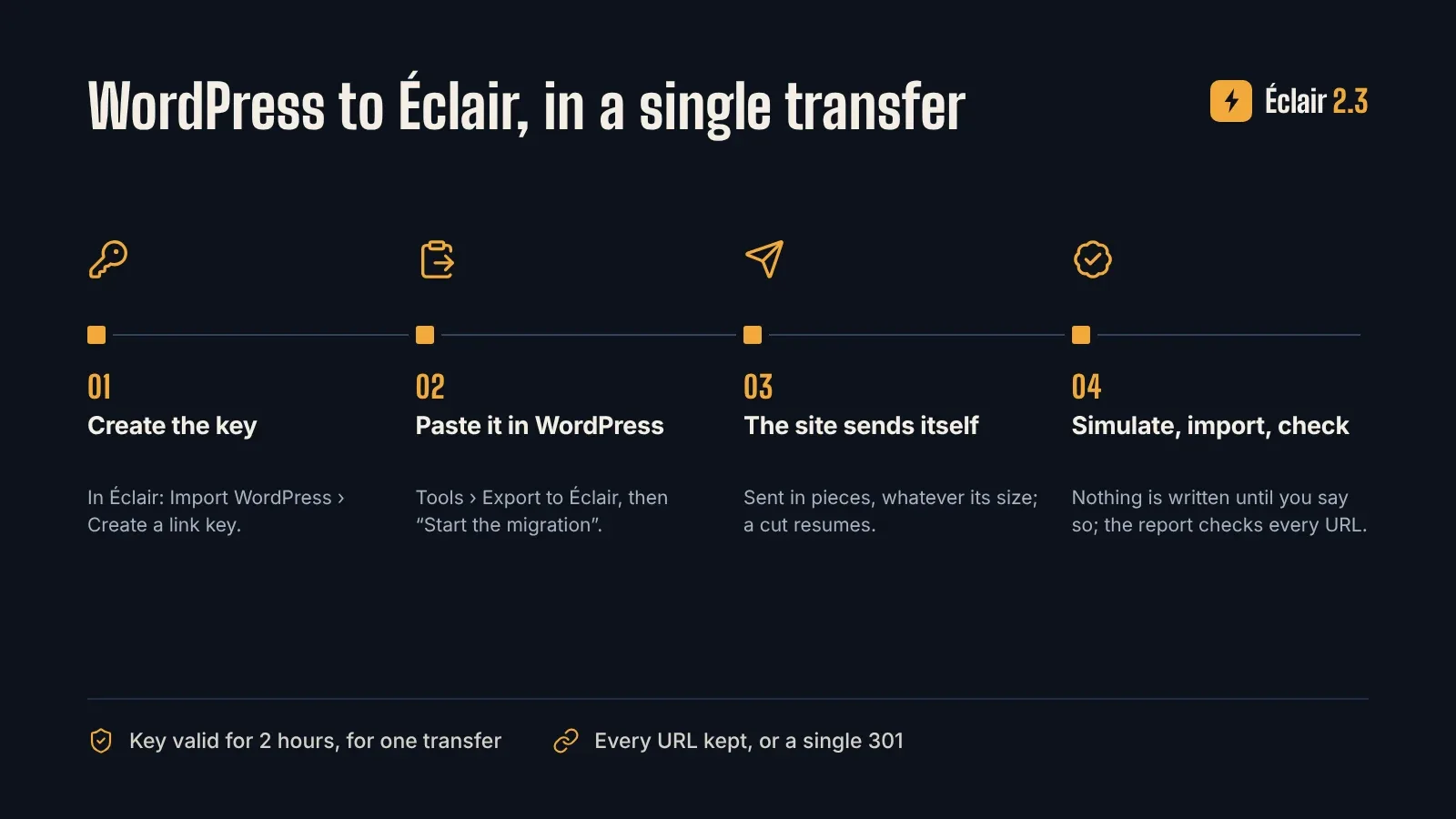
- In Éclair 2.3, add Import WordPress (Features › Add), then create a link key.
- In WordPress, install Eclair Export 1.1, open Tools › Export to Éclair, paste the key and click Start the migration.
- The site sends itself to Éclair, in pieces, whatever its size: no download, no FTP.
- Simulate, import, then hand the migration report to your client: every old URL is checked in it.
Content, images, PDFs, SEO (Yoast, Rank Math, AIOSEO) and Search Console verification, menus, WooCommerce catalogue, redirects and original dates are carried over; every URL is kept as it was or redirected with a single 301.
What often keeps people on WordPress
Many site owners would love a lighter tool, but dread the work of moving.
Years of content
Hundreds of posts, images and categories that seem impossible to copy over one by one.
Fear of losing search rankings
URLs that change without redirects, and visitors landing on pages that no longer exist.
Page builders and shortcodes
Elementor, plugin shortcodes: content that only displays properly inside WordPress.
The planned solution: a migration analyzed before it runs
You export your site from WordPress in the standard WXR format, then hand it over to Éclair Migrate. The assistant will analyze the file, flag risky items and suggest an import plan that you approve step by step.
Today, Éclair 2.0 already does the essentials: its WordPress import feature brings over posts, pages, categories and images with their URLs, as described above. Éclair Migrate will go further, with prior analysis, a preview and a final report.
- A complete inventory before anything happens
- Blocking issues flagged in advance
- A preview of the imported site
- A final report of what was migrated
Migration from WordPress · export-wordpress.xml · WXR
| Status | Item | Count |
|---|---|---|
| OK | Posts imported | 126 |
| OK | Pages imported | 18 |
| OK | Media retrieved | 342 |
| OK | SEO metadata carried over | 144 |
| OK | Redirects created | 37 |
| To review | Incompatible shortcodes | 4 |
| To review | Page-builder pages to review | 2 |
| Analysed | Internal links analysed | 512 |
Concept preview. The site and figures shown are fictitious.
What Éclair Migrate will let you do
WXR export import
WordPress’s native export file as the starting point, with no plugin to install on the old site.
Pages and posts
Titles, content, dates, statuses and excerpts imported into Éclair CMS.
Authors and categories
A mapping table to assign authors, categories and tags to your new structure.
Media
The images used in your content retrieved and reinserted in the right places.
SEO meta and custom URLs
SEO titles and descriptions carried over when present, URLs kept whenever possible.
Redirects and internal links
301 redirects generated for URLs that change, and internal links rewritten.
Incompatibility detection
Unknown shortcodes and Elementor or other page-builder content detected and listed page by page.
Pre-migration checks
File size, unreachable media, duplicate URLs: problems identified before the import.
Preview and final report
The imported site viewable before going live, then a detailed report of what worked and what needs revisiting.
Example: a nonprofit’s blog
A nonprofit has been publishing on WordPress for several years and wants a site that is easier to maintain.
- They export their site: Using the WordPress export tool, they download a WXR file containing all their content.
- Éclair Migrate analyzes it: The assistant lists the posts, the media, and about ten pages built with Elementor that will need to be redone by hand.
- They adjust the mappings: They merge three old categories into one and choose which author to assign to unattributed posts.
- They preview, then switch over: After checking, they put the site live. The old URLs redirect to the new ones.
- They read the report: The final report tells them exactly which pages to review before considering the migration complete.
The concrete benefits
- Your content moves without being copied over one by one
- You know in advance what will take work
- Your old URLs still lead somewhere
- You check the result before your visitors see it
- You keep a clear record of what was done
- You land on a lightweight CMS, with no database
Frequently asked questions about WordPress migration
Is Éclair Migrate available?
Not yet: the wizard is planned on Éclair Cloud, which is in development. But the WordPress import is already available, for free, in Éclair 2.0: add the WordPress import feature in Features and upload your site’s .xml export.
How do I migrate today?
With Éclair 2.0: export your site from WordPress (Tools › Export › All content), add the WordPress import feature, upload the file, then review the flagged content. URLs are kept and old ?p= addresses redirected.
Will my Elementor pages be imported?
Text and images can be recovered in most cases, but the builder-specific layout will need to be rebuilt with the block editor. The assistant will list the pages concerned.
Will I lose my search rankings?
Redirects, SEO meta and preserved URLs are there to limit the impact. We cannot, however, guarantee you will keep your rankings: search engines have the final say.
Will my WordPress site be modified?
No. The assistant will work from the export file, without touching your original site, which stays online until the switchover.
Get ready to move off WordPress
Join early access to be among the first to try Éclair Migrate. Signing up is free and is not a purchase.