Éclair 1.5: themes, lightweight shop and MCP connector
 By Thierry Gustin
Published
Updated
6 min read
By Thierry Gustin
Published
Updated
6 min read

Contents
Éclair 1.5 has been available since October 30, 2026. Three versions came out back to back that day: 1.3.0 brings 6 themes and a lightweight shop, 1.4.0 an MCP connector for Claude and ChatGPT, and 1.5.0 custom CSS that survives updates. Here’s what that changes for a freelancer or a small business, and how to update your site.
What’s new in Éclair 1.5?
| Version | Main new features | Automated checks | Archive |
|---|---|---|---|
| 1.3.0 | 6 themes with a live preview, a lightweight shop paid through Stripe | 374 | 416 KB |
| 1.4.0 | MCP connector for Claude and ChatGPT, choice of AI in the assistant | 445 | 432 KB |
| 1.5.0 | Custom CSS kept through updates | 456 | 433 KB |
All three versions came out on October 30, 2026, and every change is detailed in the changelog. The automated checks are Éclair’s unit and integration tests, including the replayed attacks from its security review.
What do the 6 themes give you?
Éclair now comes with 6 themes: Éclair, Editorial, Atelier, Studio, Shop and Contrast. You try them in Settings › Appearance with a live preview of your real site (home page, blog, a post, the shop, a product), on desktop or mobile. Nothing is published until you save.
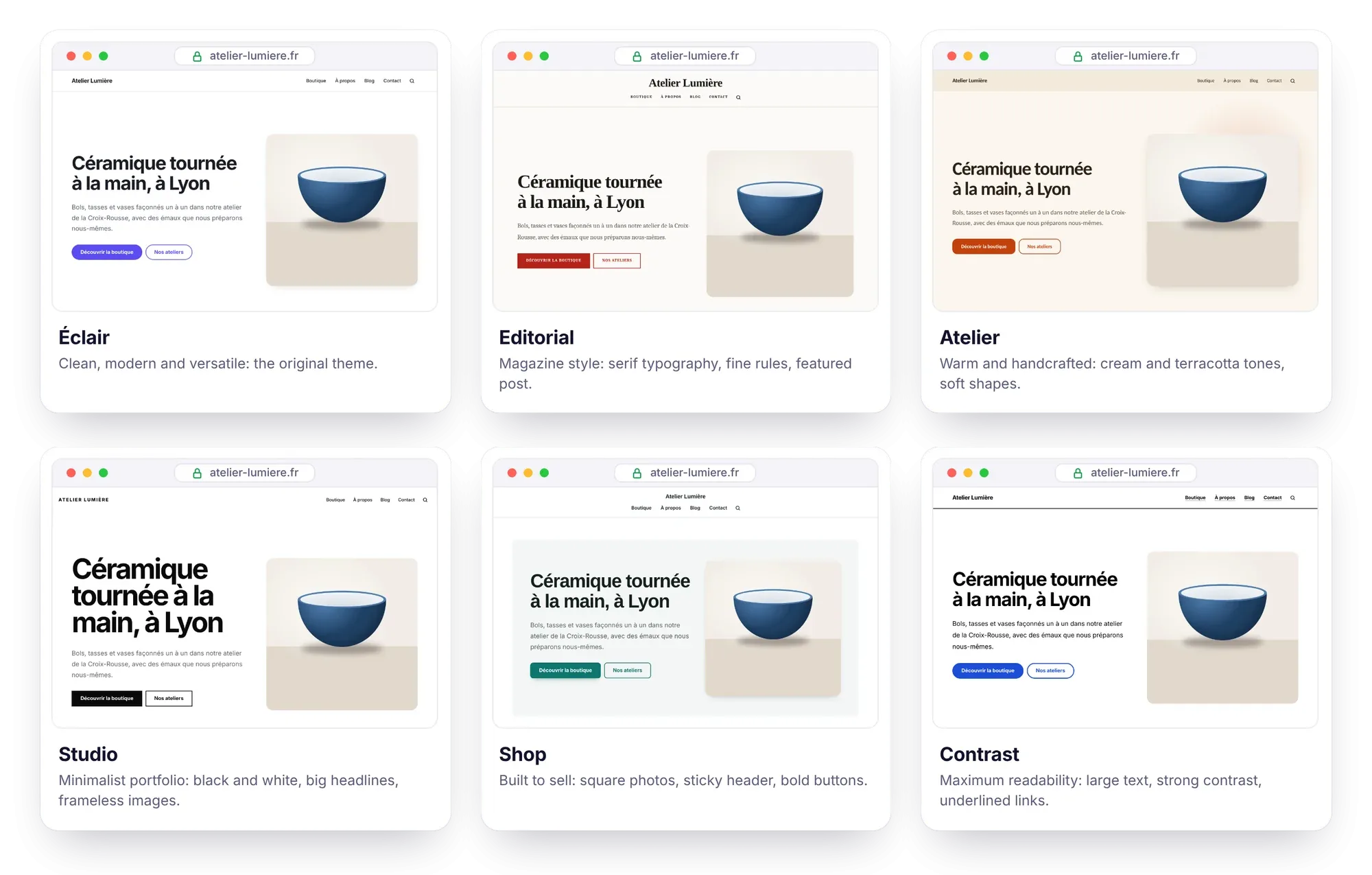
If you’re a freelancer, that means a style suited to your line of work, without touching any code: Atelier for a craftsperson or a restaurant, Studio for a photographer or an agency, Editorial for a blog or an author, Shop for a maker who sells, Contrast for a nonprofit or a public service.
And your site loses nothing: each theme is just a 1.5 to 3 KB stylesheet, and the HTML doesn’t change from one theme to another. Speed, accessibility, structured data and SEO stay exactly the same. Two settings round out the theme: the header (logo on the left, or everything centered) and the post and product lists (card grid, or a list with the image on the left). The instructions are in Themes and appearance.
How can you sell online without a full e-commerce platform?
The lightweight shop is for selling a few dozen products without the overhead of an e-commerce platform. Each product gets its own page: photo gallery, price and compare-at price, variants without JavaScript, shipping costs and returns clearly shown. Its Buy now button leads to a Stripe payment link: Stripe collects the payment, sends the receipts and handles refunds. No cart, no database, no payment details on your server.
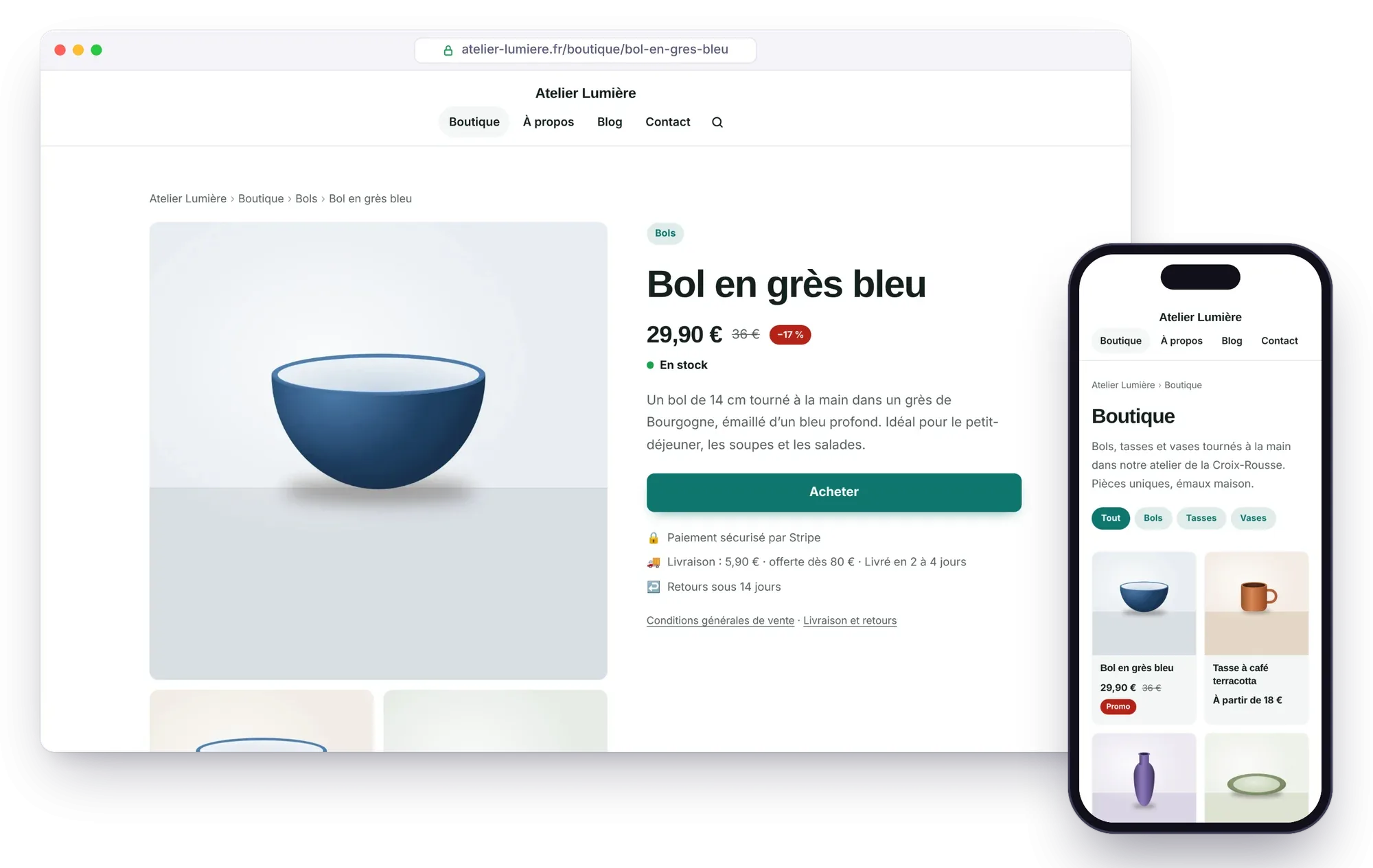
What this changes for a small business:
- No subscription, neither with Éclair nor with Stripe. Only Stripe’s fee applies, for example 1.5% + €0.25 per payment with a standard card from the European Economic Area (prices as of October 30, 2026, on stripe.com).
- Product pages tailored for Google: Product and Offer structured data, return policy included, and a Google Merchant Center feed (
/products.xml) to appear for free in the Shopping tab. - Prices that AI can read: each product’s price and availability in
llms.txtand in the Markdown version of each product page. - A product page written from a photo by the AI assistant, which never makes up a price.
As a safeguard, the shop only opens once a legal notice and terms of sale are published: have them reviewed, since as the seller you’re legally responsible for them.
Let’s be clear about its limits: no multi-product cart, no discount codes, no customer accounts, no automatic inventory management. For hundreds of products, a full e-commerce platform such as Shopify, WooCommerce or PrestaShop is still a better fit. Everything is explained in The lightweight shop, and our page on selling online with Éclair helps you decide whether this model suits you.
Why connect Claude or ChatGPT to your site?
Already working in Claude or ChatGPT? Since 1.4.0, the MCP connector (Model Context Protocol) opens your site to them. Your AI reads your content, gets your editorial profile and Éclair’s SEO and GEO rules, creates drafts and prepares suggested changes, which you review in the editor.

The benefit for a freelancer: your subscription does the work. No API key, no cost for the site: image generation isn’t even offered to the connector, so that it never spends anything. And just like with the built-in assistant, nothing is published or deleted without you.
On the security side, the connector is off by default and goes through OAuth 2.1 authorization with PKCE: you give your approval after logging in, two-factor authentication included, and the access tokens, valid for one hour, are renewed automatically. The whole thing fits in under 25 KB of PHP, with no dependencies.
Compatible plans, checked on October 30, 2026: Claude Free (only one custom connector), Pro, Max, Team and Enterprise; ChatGPT Business, Enterprise and Edu; ChatGPT Pro, read-only. These plans change quickly: the step-by-step instructions and the sources are in the MCP connector guide.
Version 1.4.0 also improves the built-in assistant: with both your Claude and ChatGPT API keys saved, you choose the AI for each conversation. To compare the two ways of working with AI, see our page on AI in Éclair.
Why doesn’t your custom CSS disappear anymore?
Until now, tweaking the style meant editing the theme files, in app/theme/, which every update replaces. Since 1.5.0, paste your rules into Settings › Appearance › Custom CSS instead:
- they’re added after the theme on every page, so they take precedence;
- they’re stored with your data, in
data/, which updates never touch; - the
/*dark*/ … /*/dark*/markers work: their rules disappear when dark mode is set to “Always light”; - for security, the
<character,@importrules and control characters are removed, and the field accepts 64 KB at most.
If you’re a freelancer managing a client’s site, it’s the guarantee that your tweaks will survive the next version.
How do you update to Éclair 1.5?
The procedure hasn’t changed, and it doesn’t touch your content:
- In Security › Backup, click Download a backup.
- Via FTP, delete the
app/andassets/folders, then upload the ones from the new version along withindex.phpand.htaccess. - Don’t touch
data/(content, settings, accounts, custom CSS) ormedia/(images). - In the admin, click Settings › Advanced › Clear cache.
Don’t forget the new .htaccess: on Apache, it’s what passes along the authorization header the MCP connector needs.
After the update, nothing changes without you: the Éclair theme, the original one, stays active until you choose another, and the shop stays closed and the MCP connector off until you turn them on. Everything is detailed in the Updating, backing up, moving guide, and the 433 KB archive is waiting for you on the Download page.
What comes next?
As with previous versions, your feedback will shape what comes next. An idea, a bug, a question? Write to me through the contact page or open an issue on GitHub.
Frequently asked questions about Éclair 1.5
Does updating to Éclair 1.5 change my site’s theme?
No. The Éclair theme, the original one, stays active until you choose another one in Settings › Appearance. The shop and the MCP connector stay off until you turn them on.
Can I go straight from 1.2.0 to 1.5.0?
Yes: the procedure is the same whatever version you have, and 1.5.0 includes the new features of 1.3.0 and 1.4.0. Just make a backup first.
Do I have to pay for the shop or the MCP connector?
No. Éclair is still free. The shop only costs Stripe’s fee on each payment, and the MCP connector uses your Claude or ChatGPT subscription, with no API key.
Will my changes to theme.css be kept?
No: the update replaces the app/ folder. Move your rules into Settings › Appearance › Custom CSS: stored in data/, it survives updates since 1.5.0.
Read next

Éclair 1.7: Visual mode and pages created by AI
Éclair 1.7 adds Visual mode, to edit your page as it actually looks, and complete pages created by AI. What’s new, what it costs and how to update.
Migrate from WordPress to Éclair: the step-by-step method
Migrate from WordPress to Éclair without losing your rankings: URL inventory, recreating pages, 301 redirects and the switchover, step by step.
GEO: how to get your site cited by ChatGPT, Perplexity and Gemini
GEO helps your site get cited by ChatGPT, Perplexity and Gemini: clear writing, structured data, llms.txt and AI bot rules. The complete method.