Éclair 1.9: art direction V2, tweaked in one click
 By Thierry Gustin
Published
6 min read
Contents
Éclair 1.9 has been available since November 2, 2026. With 1.8, you chose your art direction from 12; now you can tweak it in one click: bolder, quieter, more colorful… New layouts and 65 line-drawn icons widen the choice even further. Together, 1.8 and 1.9 make up art direction V2.
What’s new in Éclair 1.9?
| New feature | What it gives you |
|---|---|
| One-click tweaks | Six buttons transform your direction, the preview updates instantly and every step can be undone |
| New layouts | A banner with the image on the left or framed, numbered features, rules between sections, three button styles |
| 65 line icons | Recognized from common emoji, including 36 new ones from Lucide |
| Imagine my direction with AI | Its three suggestions can use the new layouts |
| Design score | It no longer asks for icons on numbered features |
| Under the hood | Lighthouse at 100 on 10 pages, 485 KB archive, 556 checks |
Art direction V2 is 1.8 and 1.9 combined: 12 directions, an AI that imagines yours (three suggestions for about $0.03), the Design score, guaranteed contrast and a heading typeface served by your site, plus the tweaks and layouts of 1.9. New to art directions? Start with the post about Éclair 1.8.
How do you tweak your direction in one click?
- In Settings › Appearance, choose one of the 12 directions, or one of the AI’s suggestions.
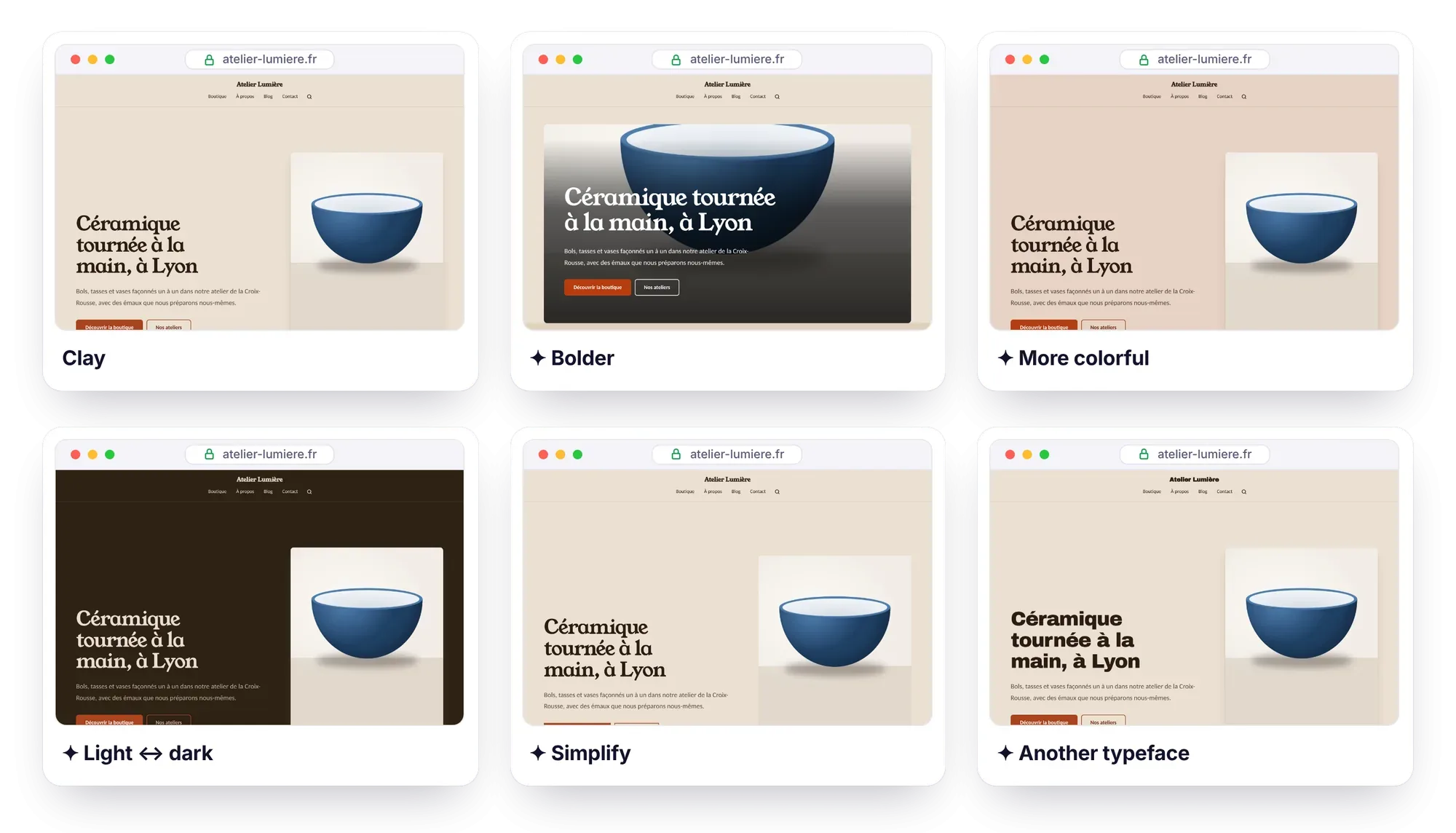
- Below the cards, click one of the six one-click tweaks: the preview of your real site updates instantly.
- Stack up tweaks, undo the ones you don’t like, then save.
Each button changes several settings at once:
| Tweak | What changes |
|---|---|
| Bolder | Larger headings, more air, a more dramatic banner (poster, then full-bleed image), color bands, a more vivid accent, solid buttons |
| Quieter | Subtler headings, normal case, thin borders instead of shadows, a calmer banner, a softer accent |
| More colorful | Background and bands tinted with the accent color, color bands, a more vivid accent |
| Simplify | Thin borders, no icons, plain background, more air, squarer corners, features in columns |
| Light ↔ dark | Inverts the lightness of the background, bands and text, keeping their hues |
| Another typeface | Moves to the next heading typeface, alternating families (serif, grotesque, condensed…) |
Tweaks stack up: More colorful, then Another typeface, then Light ↔ dark… Don’t like a step? Undo tweak goes back one step at a time. Contrast stays guaranteed at every step, and nothing is published until you save. For a precise setting, Adjust the direction is still there, option by option.
What are the new layouts?
The Adjust the direction panel gains new options, to combine with those from 1.8:
- A home banner with the image on the left, or framed: the text and image together in a colored panel.
- Numbered features (01, 02, 03…): the number replaces the icon, handy for presenting steps.
- Rules between sections: a thin line separates the sections, a third choice after the plain background and color bands.
- Buttons that are solid, outline or underlined links with an arrow. On a full-bleed banner, outline buttons and underlined links stay white, readable over the photo.
How do the 65 line icons work?
In a Features block, you type whichever emoji comes naturally. With the Line icons setting, Éclair recognizes it and displays a line-drawn icon in its place. It now knows 65 of them, based on common emoji: ☕ 🚗 🐶 ✂️ 🎓 💼 🌸…
The 36 new ones come from Lucide, under the ISC license: coffee, car, animals, hairdressing, sport, diploma, padlock, flowers, wine, cake, health, fashion, mountain… Enough to illustrate a café, a garage, a hair salon, a pastry shop or a health practice.
The Design score still flags an emoji that has no line icon. With numbered features, however, it no longer asks you for icons, since the number replaces them.
What does the AI suggest with Éclair 1.9?
Imagine my direction with AI now knows all these options. Describe your business, your audience and the mood you’re after, then click Suggest 3 directions: each suggestion can use a framed banner, numbered features, rules or underlined-link buttons. The card thumbnails have also been updated to show these layouts.
Everything else stays the same: the AI only picks from Éclair’s settings and never writes CSS, nothing is saved without you, and the estimated cost is still about $0.03 for all three suggestions with Claude Sonnet 5.5. Like a suggestion, but not quite? Choose it, then tweak it in one click.
Does your site stay fast?
Yes. The Lighthouse measurements for 1.9 cover 10 pages: 3 with a classic theme, 5 with directions and 2 with the new layouts.
| Measurement | Result |
|---|---|
| Lighthouse: performance, accessibility, best practices and SEO | 100/100/100/100 on all 10 pages |
| Cumulative Layout Shift (CLS) | 0 |
| Largest Contentful Paint (LCP), on simulated mobile | 0.79 to 0.97 s |
| Archive to download | 485 KB, under 1 MB once unzipped |
| Automated tests | 556 checks passed, including 54 design checks |
The 6 classic themes keep a public rendering identical, down to the byte, to that of 1.8. The installation view is now compressed, like the admin views: so the PHP zlib extension is still required. Finally, the 17 new interface strings are translated into the admin’s 6 other languages.
How do you update to Éclair 1.9?
The procedure is the same as for 1.8, and it doesn’t touch your content:
- In Security › Backup, click Download a backup.
- Via FTP, delete the
app/andassets/folders, then upload the ones from the new version along withindex.phpand.htaccess. - Don’t touch
data/(content, settings, accounts, custom CSS) ormedia/(images). - In the admin, click Settings › Advanced › Clear cache.
There’s nothing extra to check compared with 1.8. If you’re coming from 1.7 or earlier, just check what 1.8 already required: the PHP zlib extension, enabled by default almost everywhere. The Updating, backing up, moving guide details each step, and the 485 KB archive is waiting for you on the Download page.
What comes next?
Your feedback decides what comes next, as with every version. Missing a tweak, or an icon for your line of work? Let me know through the contact page or open an issue on GitHub.
Frequently asked questions about Éclair 1.9
Does a tweak change my site right away?
No. A tweak only changes the preview: nothing is published until you save. And Undo tweak goes back one step at a time.
Do I need the AI assistant to tweak my direction?
No. The tweaks, the new layouts and the 65 icons work without AI. Only “Imagine my direction with AI” requires the assistant, with your Claude or ChatGPT key.
How much do the new features in Éclair 1.9 cost?
Nothing: Éclair is still free, under the MIT license, and the tweaks don’t use AI. Only the AI’s suggestions have a cost, about $0.03 for all three with Claude Sonnet 5.5, paid with your own API key.
Do the new layouts slow down my site?
No. Two of the test pages use them, and Lighthouse gives them 100 in all four categories, with a CLS of 0.
Can I go straight from 1.7 to 1.9?
Yes: the procedure is the same whatever version you have, and 1.9 includes the new features of 1.8. Check the PHP zlib extension, required since 1.8, and make a backup first.
Read the themes and directions guide
Read next
Éclair 1.8: 12 art directions for a site like no other
Éclair 1.8 adds 12 art directions, an AI that imagines yours and a Design score in the editor. Guaranteed contrast, and Lighthouse still at 100.
Éclair 1.7: Visual mode and pages created by AI
Éclair 1.7 adds Visual mode, to edit your page as it actually looks, and complete pages created by AI. What’s new, what it costs and how to update.
Éclair 1.5: themes, lightweight shop and MCP connector
Éclair 1.5 brings 6 themes with a live preview, a lightweight shop paid through Stripe and an MCP connector for Claude and ChatGPT. What’s new, how to update.